MetaMask Browser Extension Wallet demonic Vulnerability Analysis

On 16 June 2022, MetaMask (MM) officially disclosed a security issue discovered by a white-hat researcher, dubbed the demonic vulnerability. The vulnerability affects versions < 10.11.3. Given MM’s large user base and the number of wallets developed based on MM, the impact is significant — MM generously awarded the white-hat researcher a $50,000 bounty. After the team synced me on this vulnerability, I began analysing and reproducing it.
Vulnerability Analysis
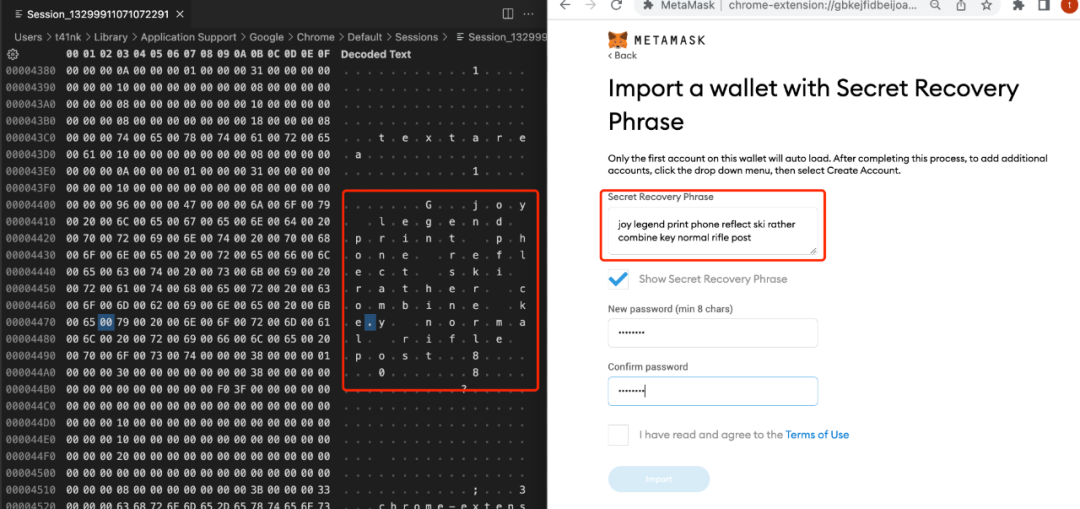
The white-hat researcher named this vulnerability demonic vulnerability. The specific description is rather complex, so I’ll try to explain it as simply as possible. When importing a seed phrase in the MM browser extension wallet, if the user clicks the “Show Secret Recovery Phrase” button, the browser caches the complete plaintext seed phrase on the local disk. This leverages the browser’s own mechanism: the browser saves Text content from Tab pages from memory to disk, so that it can preserve the page state during browser use and restore it when the page is reopened next time.
Based on my understanding of the vulnerability, I began the reproduction. Since MM only provided a brief description without disclosing technical details, I encountered the following issues during reproduction:
- The file path where the cache is written to disk is unknown
- When the cache is written to disk is unknown
To solve problem 1, I analysed and tested the browser’s cache directory structure. I found that when using Chrome, the relevant Tabs cache is recorded in the following directory:
Tabs cache path:
/Users/$(whoami)/Library/Application Support/Google/Chrome/Default/Sessions/
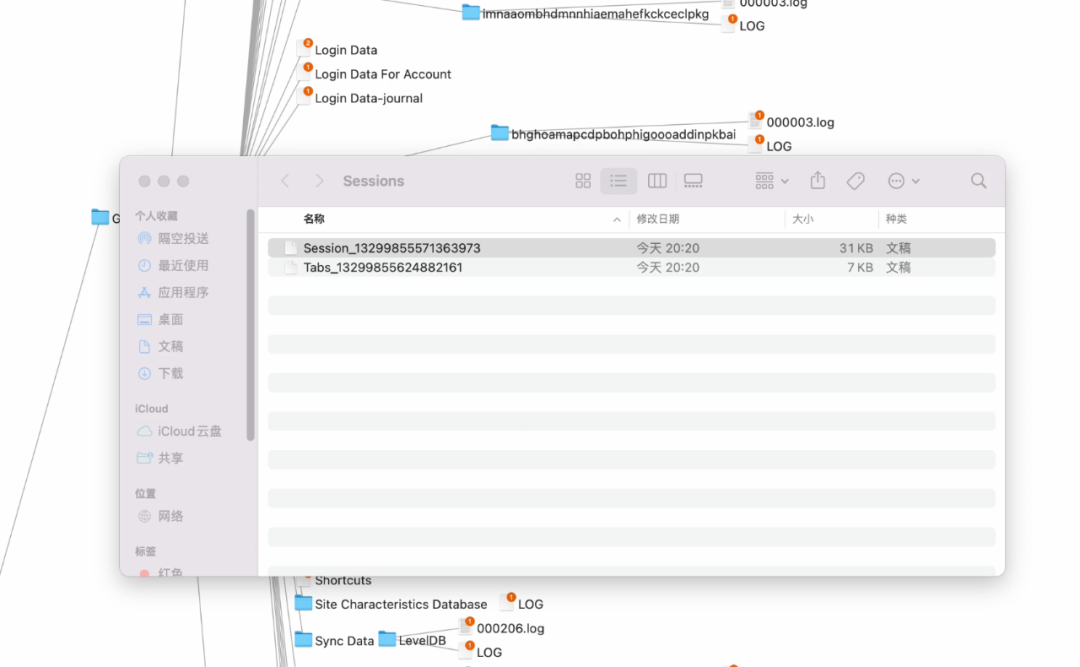
Continuing to solve problem 2: the Sessions directory records Tabs cache. To find out when the cache is written, I decomposed the entire seed phrase import process and observed changes in the Sessions data after each step. I found that after entering the seed phrase data on the following page, you need to wait 10–20 seconds, then close the browser — the plaintext seed phrase information will be recorded in the Sessions cache data.
Here is the reproduction video:
Fix and Impact
Under normal use, MM stores seed phrase-related data in memory, which is generally considered relatively safe (in an earlier SlowMist Hacking Time, I found that when a user is normally using MM, the plaintext seed phrase can be extracted via hook techniques — but only when the user’s computer is controlled by a malicious program). However, because the demonic vulnerability causes the seed phrase to be cached to the local disk, new exploitation scenarios emerge:
- The plaintext seed phrase data cached on the local disk can be read by other applications. On a PC, it is difficult to guarantee that no other application will read the Sessions cache file.
- The plaintext seed phrase data cached on the local disk — if the disk is not encrypted — can be recovered through physical access. For example, in scenarios like computer repair, when someone has physical access to the computer, they can read the seed phrase data from the hard drive.
For extension wallet project teams: if you use Text-type input for seed phrase import on a Tab page, you are affected by the demonic vulnerability. You can refer to MetaMask Version >= 10.11.3’s implementation — defining a separate input field for each seed phrase word, with the input type set to Password.
The SlowMist Security Team has already assisted multiple extension wallet project teams with vulnerability testing and guided them through remediation. If you need assistance testing for demonic vulnerability, please contact the SlowMist Security Team.
Final Thoughts
The essence of this vulnerability is a “consistency gap in security boundaries”: MetaMask’s design assumes the seed phrase exists only in memory, but the browser’s Sessions persistence mechanism unknowingly writes this in-memory data to disk. Neither system’s design is wrong on its own — one is responsible for page state recovery, the other for seed phrase security — but their interaction creates an unforeseen leakage path. This reminds us that when evaluating security solutions, we must not only look at our own code logic, but also understand whether the underlying platform (in this case, the browser) has implicit data persistence behaviours. For all extension applications that handle sensitive input, setting the input field type to Password is not just to prevent shoulder-surfing — it is also to prevent capture by the browser’s various caching mechanisms.
Reference:
https://medium.com/metamask/security-notice-extension-disk-encryption-issue-d437d4250863