Sky-High Fee Analysis: ethjs-util Floating-Point Data Processing Flaw

Incident Background
This analysis stems from a transaction that transferred 100,000 USDT but incurred a sky-high fee of 7,676 ETH.
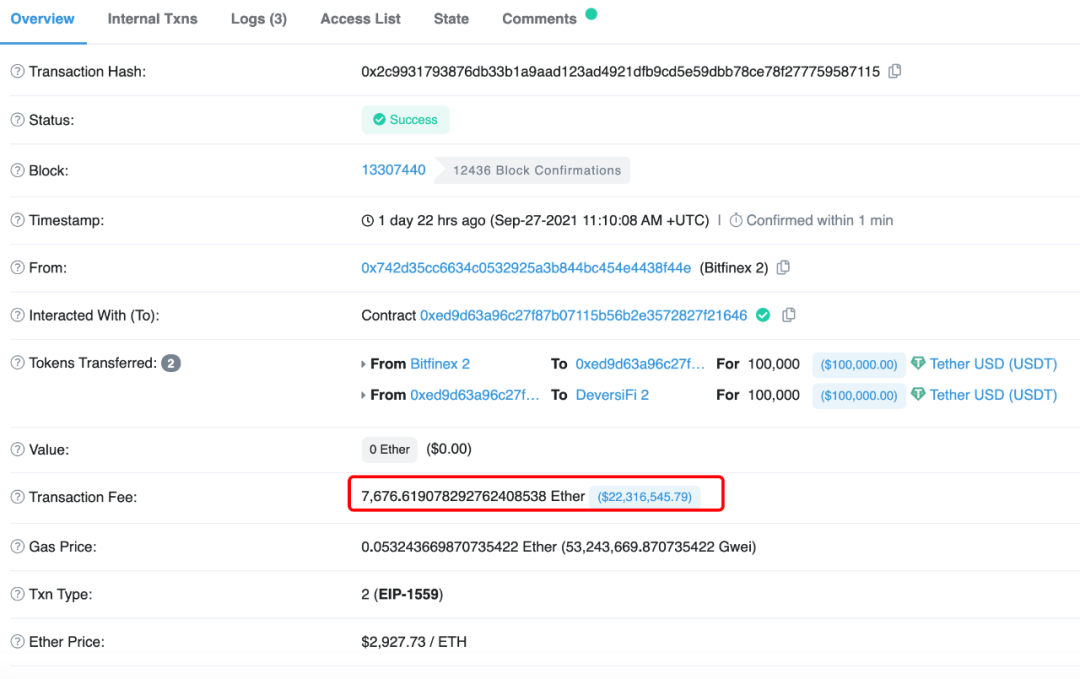
Transaction hash: 0x2c9931793876db33b1a9aad123ad4921dfb9cd5e59dbb78ce78f277759587115
Key Code Analysis
The analysis began based on the description in this Issue.
We will explain the problem in reverse order, which makes it easier to understand. The core issue is that ethjs-util’s intToBuffer does not support passing in floating-point data.
Let’s first look at the key code. Most of the discussion centers on ethereumjs, focusing primarily on the values of the two parameters maxPriorityFeePerGas and maxFeePerGas. Because floating-point values were passed in, the calculations went wrong, producing an incorrect fee and thereby triggering the “sky-high fee incident.”
After analysis, both of these parameters are processed by toBuffer, so we began analyzing toBuffer.
Reference code: ethereumjs-monorepo eip1559Transaction.ts#L200-L201
this.maxFeePerGas = new BN(toBuffer(maxFeePerGas === '' ? '0x' : maxFeePerGas))
this.maxPriorityFeePerGas = new BN(
  toBuffer(maxPriorityFeePerGas === '' ? '0x' : maxPriorityFeePerGas)
)
toBuffer calls ethjs-util’s intToBuffer function, which mainly handles two things.
Reference code: ethjs-util.js#L1950
function intToBuffer(i) {
  var hex = intToHex(i);
  return new Buffer(padToEven(hex.slice(2)), 'hex');
}
- Convert int to Hex
function intToHex(i) {
  var hex = i.toString(16);
  return '0x' + hex;
}
- Check whether the length is evenly divisible by 2; if not, prepend a
0to the string. This is mainly to ensure the data can be successfully written into the buffer in pairs of two characters.
function padToEven(value) {
  var a = value;
  if (typeof a !== 'string') {
    throw new Error('[ethjs-util] while padding to even, value must be string, is currently ' + typeof a + ', while padToEven.');
  }
  if (a.length % 2) {
    a = '0' + a;
  }
  return a;
}
Using the erroneous sample data 33974229950.550003 for analysis, after processing through intToHex and padToEven within the intToBuffer function, the result is 7e9059bbe.8ccd. Both browser JS and Node.js produce the same result at this stage.
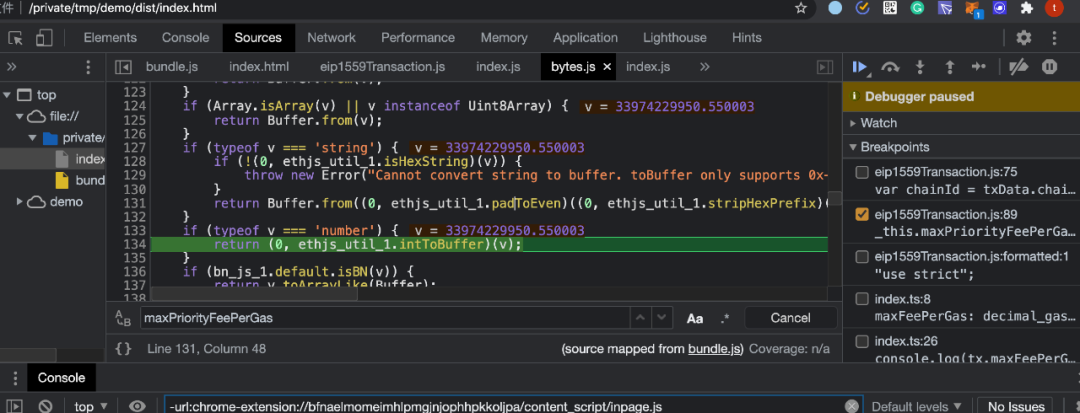
The divergence occurs in the new Buffer operation: new Buffer(padToEven(hex.slice(2)), 'hex');
Processing Analysis: Browser JS
The JS files were bundled with webpack, referenced, and then debugged in the browser.
First, the input sample string 33974229950.550003 enters the intToBuffer function for processing.
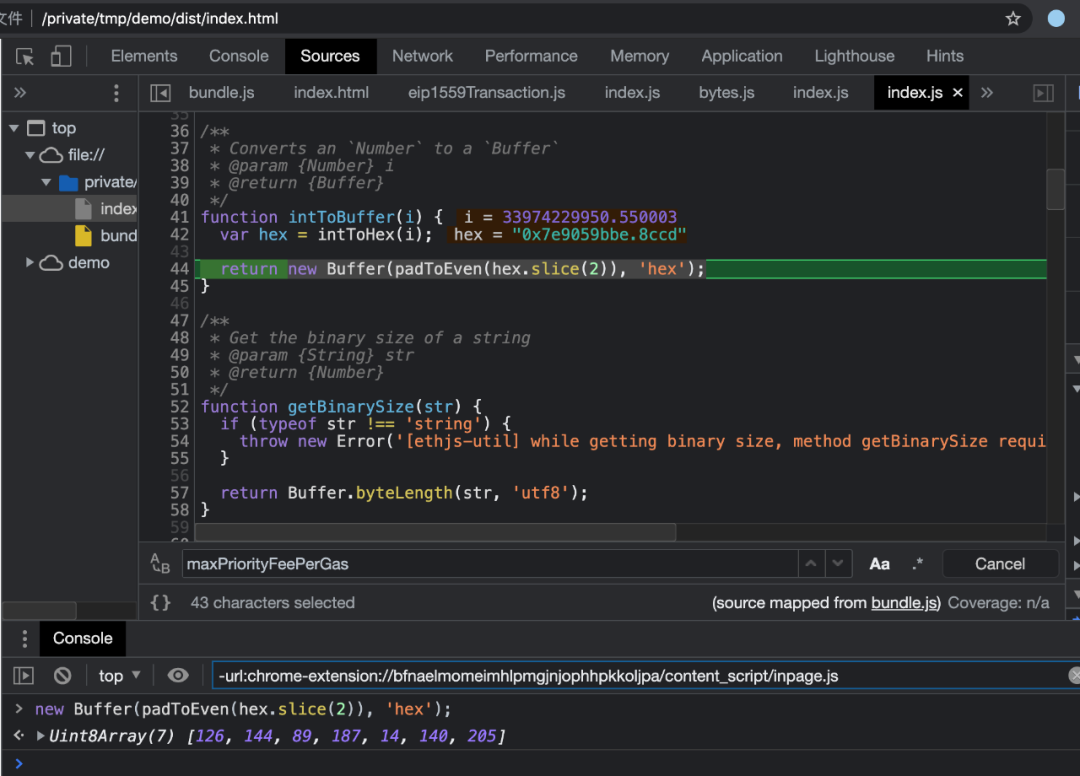
Analyzing the processing flow of intToBuffer in parallel, this part follows the same code logic as in the “Key Code Analysis” section. The conversion yields 7e9059bbe.8ccd.
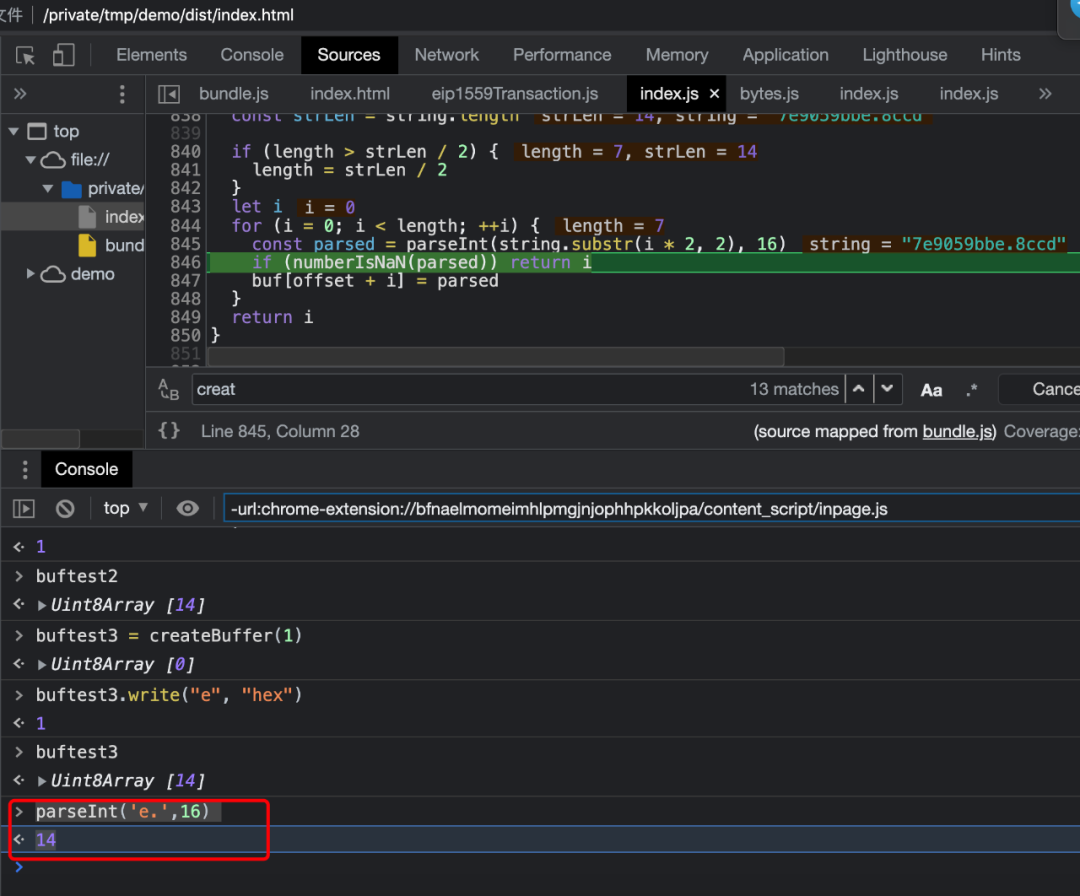
Next, we analyze how the converted string is filled into the buffer. Through this step we obtain the buffer contents 126, 144, 89, 187, 14, 140, 205, corresponding to 7e, 90, 59, bb, e, 8c, cd.
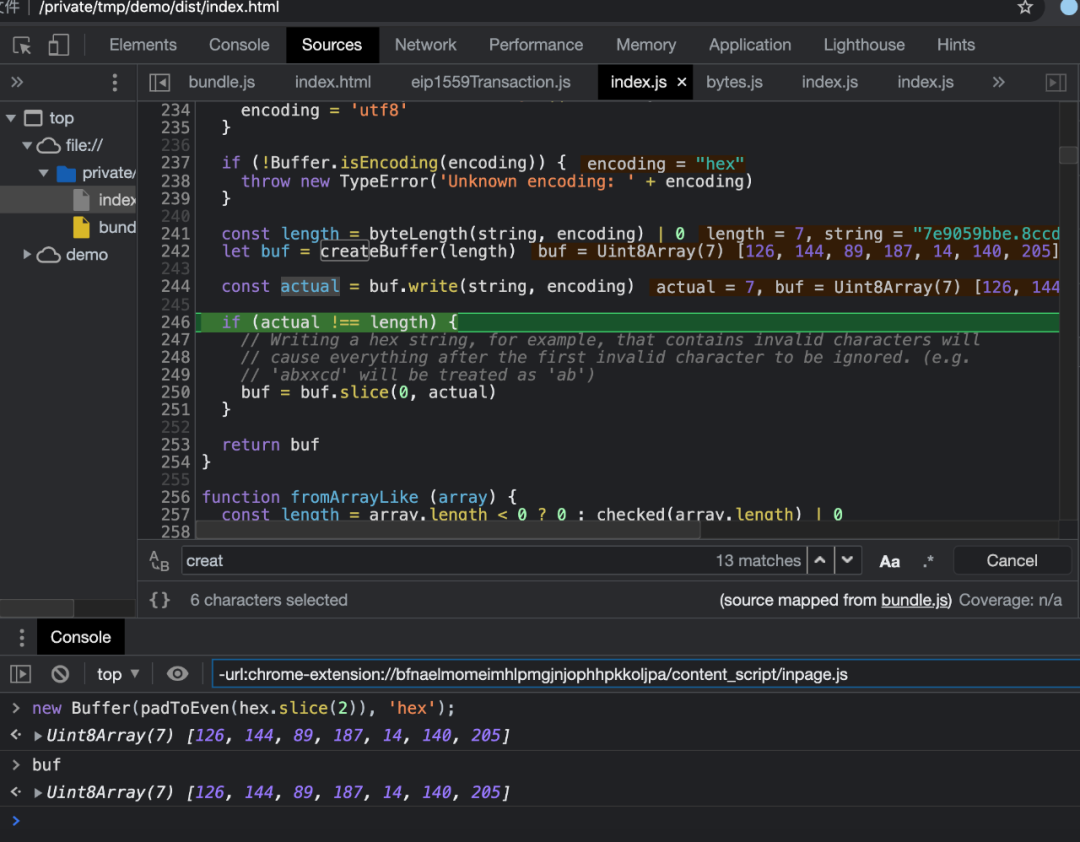
Here we noticed that the decimal point in e. disappeared. So we began investigating the mystery of the vanishing decimal point, tracing it to the hexWrite function. This function splits the resulting data into groups of two characters and then uses parseInt to parse each split group.
However, parseInt('e.',16) -> 14 === parseInt('e',16) -> 14. The vanished decimal point was swallowed by parseInt, causing the data ultimately written to the buffer to be incorrect. The value written to the buffer is 7e9059bbe8ccd.
Processing Analysis: Node.js
The problem in the browser was that the decimal point in 7e9059bbe.8ccd was swallowed by parseInt when writing to the buffer, causing the data to be incorrect. However, upon analysis, Node.js’s data is also wrong, and the cause of the error is different from the browser’s.
Let’s first look at the following example:
Three different sets of data fed into a buffer in Node.js produced the same result. After analysis, it turns out Node.js’s buffer has a subtle behavior: when data is split into pairs, if a pair cannot be properly parsed as hex, that pair and all subsequent data are left unprocessed, and only the portion that could be properly parsed is returned. This can be thought of as truncation. This behavior can be traced to the code logic in node_buffer.cc within Node.js’s underlying buffer implementation.
> new Buffer('7e9059bbe', 'hex')
<Buffer 7e 90 59 bb>
> new Buffer('7e9059bbe.8ccd', 'hex')
<Buffer 7e 90 59 bb>
> new Buffer('7e9059bb', 'hex')
<Buffer 7e 90 59 bb>
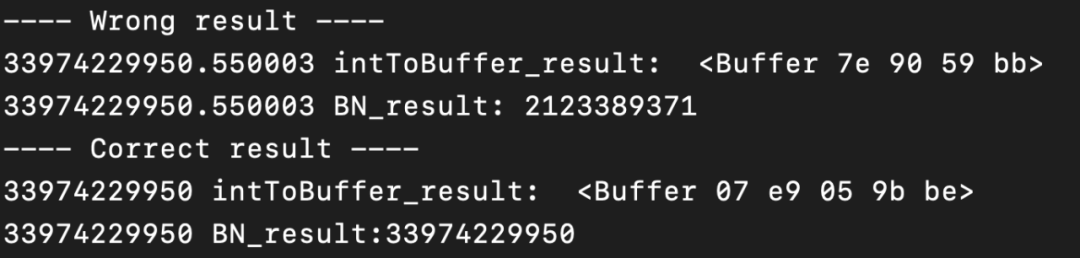
Comparison of Execution Results
Because Node.js truncates e. and everything after it from the original data 7e9059bbe.8ccd, the final incorrect value is 7e9059bb, which is smaller than the correct value 07e9059bbe.
Browser execution result:

Because the browser swallows the . from the original data 7e9059bbe.8ccd, the final incorrect value is 7e9059bbe8ccd, which is much larger than the correct value 07e9059bbe.
Root Cause
ethjs-util’s intToBuffer function does not support floating-point data, and within this function there is no check on the type of the input variable to ensure it is of the expected type. Since ethereumjs’s toBuffer invokes ethjs-util’s intToBuffer for processing and also does not validate the data, this incident occurred. Fortunately, a kind miner ultimately returned the “sky-high fee of 7,626 ETH.”
Lessons Learned
From the perspective of third-party library authors, reliable and secure coding standards should be followed during development. At the beginning of each function, the legitimacy of input data should be checked to ensure the data and code logic execute as expected.
From the perspective of library consumers, users should read the third-party library’s development and integration documentation themselves, and also test the logic that interfaces with the third-party library. By constructing large volumes of test data, they can ensure the business executes as expected under normal conditions and maintain a high standard of test case coverage.